

- Description
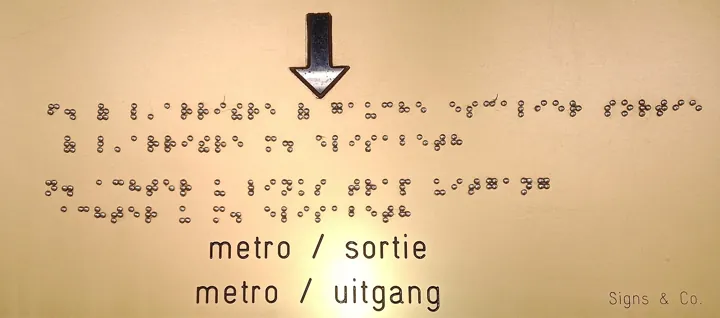
- Plaque de signalisation bilingue français-néerlandais, avec son texte en braille gravé en relief.
- Source
- Jiròni B. · original page
- Licence
- CC0 Public domain
 Accessibility and Multilingual
This theme covers two inclusion requirements: accessibility (contrast, keyboard navigation, tab order, alternative text, screen reader, not conveying information through color…
In short
This theme covers two inclusion requirements: accessibility (contrast, keyboard navigation, tab order, alternative text, screen reader, not conveying information through color alone) and multilingual (model metadata translations via cultures, report labels, regional formats, translated data, language-specific experience). Multilingual is treated here as a product topic, not decoration: one code base, multiple languages.
Level: 🟢→🔴 · Theme code: ACC
1. Why this theme#
Color-blind users (red-green vision deficiency: up to around 8% of men and 0.5% of women of Northern European ancestry, less in other populations), users with low vision, or users who cannot use a mouse are excluded from a report that relies on color and hover. From a regulatory standpoint, digital accessibility is mandatory in several jurisdictions (see PD — compliance; reference framework: WCAG, level AA; to be verified depending on the applicable legal framework). On the language side: a report distributed to field teams in several countries that exists in only one language will be worked around; copying the report per language multiplies maintenance.
2. What this theme measures#
- Axis: from neglect to an inclusive, tooled product, without duplication by language.
- Key indicators: compliance of a sample of pages against an accessibility checklist; share of model objects translated per target language; number of reports duplicated by language.
- Units: % of criteria, % translation, number of copies.
3. The 5 levels#
| Level | Short name | Promise | Typical indicator (orders of magnitude) |
|---|---|---|---|
| 1 | Ignored | The report works for an able-bodied user, in one language. | No checks |
| 2 | Basic | Contrast is readable and nothing relies on color alone; labels are in the main language. | Contrast ≥ 4.5:1 on text |
| 3 | Navigable and translated | The report can be navigated with keyboard and screen reader, and its labels follow the user's language. | Tab order defined; > 90% of visible objects translated |
| 4 | Tooled | Accessibility and translations are checked at every release and managed from a single source. | Automated checks; translation pipeline |
| 5 | Inclusive without fork | A single report serves all users, regardless of language, device, or disability status. | 0 copies per language; positive external accessibility audit |
4. Milestones by level#
| ID | Milestone | Verifiable evidence |
|---|---|---|
| BI-ACC-1.1 | The report displays correctly in the source language (accents, formats) | Review |
| BI-ACC-1.2 | Applicable accessibility requirements are identified | Requirements list |
| BI-ACC-1.3 | An accessibility/translations contact is designated | Sheet |
| BI-ACC-2.1 | Text/background contrast ≥ 4.5:1 (3:1 for large text) | Tool-based check |
| BI-ACC-2.2 | Information is never conveyed by color alone (shape, label, pattern) | Visual review |
| BI-ACC-2.3 | Explicit page and visual titles | Review |
| BI-ACC-2.4 | Number and date formats consistent with the source language | Formats set |
| BI-ACC-3.1 | Tab order defined on each page | Keyboard test |
| BI-ACC-3.2 | Alternative text on informative visuals; decorative visuals marked as such | Verified sample |
| BI-ACC-3.3 | Screen reader test on main user journeys | Test report |
| BI-ACC-3.4 | Cultures (languages) declared in the model; translated table, column, measure, hierarchy names, and formats | Culture files in repository |
| BI-ACC-3.5 | Report labels (titles, buttons) translated via measures or metadata | Per-language test |
| BI-ACC-3.6 | Formats follow user regional settings (separators, currency, first day of week) | Test across multiple regions |
| BI-ACC-4.1 | Single source for translations (table, dictionary, translation system) | Labels repository |
| BI-ACC-4.2 | Translations generated in pipeline to culture files, with human review | Pipeline + review |
| BI-ACC-4.3 | Automated accessibility checks (built-in checker, custom rules) at each release | Check report |
| BI-ACC-4.4 | Translation completeness measured per language | Completeness dashboard |
| BI-ACC-4.5 | Data itself is multilingual (dimension labels per language) managed in source | Columns by language |
| BI-ACC-5.1 | Single artifact for all languages (no country fork) | Inventory |
| BI-ACC-5.2 | External accessibility audit or audit by concerned users | Report |
| BI-ACC-5.3 | User accessibility feedback integrated into the roadmap | Log |
| BI-ACC-5.4 | New language added in days, with no model change | Observed lead time |
5. Detailed reading by level#
🟢 Level 1 — Ignored#
- Signs: light gray text on white background, red/green only, one manually copied report per language.
- Difficulty: 1/5 · Effort: 1/5.
🟢 Level 2 — Basic#
- Signs: contrast checked, shapes and labels in addition to color, explicit titles. The gain is immediate and low-cost.
- Limit: a readable report can still be inaccessible by keyboard.
- Difficulty: 2/5 · Effort: 2/5.
Choose a palette that stays distinct in grayscale and for major types of color blindness; add an ▲▼ arrow or a label to positive/negative variances.
🟡 Level 3 — Navigable and translated#
On the accessibility side: tab order, alternative text, screen reader user journeys, bookmarks/navigation usable by keyboard, avoid content that appears only on hover.
On the multilingual side, three distinct layers (a frequent source of confusion):
| Layer | What is translated | Mechanism |
|---|---|---|
| Model metadata | table, column, measure, hierarchy names, display folders, descriptions | Cultures / semantic model translations (TMDL: cultures/fr-FR.tmdl) |
| Report labels | page titles, visual titles, buttons, tooltips | Measures returning a label by language, or report metadata |
| Data | dimension labels (product, status) | Per-language columns in source, or translation table; not covered by cultures |
The user language is the one sent by their browser (Accept-Language header, modifiable via the language URL parameter for tests; the mobile app uses device regional settings); a label measure can read it with the DAX function USERCULTURE(), which returns the user culture only in a measure, not in a calculated column or table.
cultureInfo fr-FR
    translations
        model Model
            table FACT_VISITE
                caption: Visites
                description: Faits de visite
                column VIS_COD
                    caption: Code visite
(Structure excerpt, as serialized by Power BI Desktop translations: translations → model → translated object, with caption and description properties; TMDL documentation describes the cultures/ folder but not this content in detail, hence the value of starting from a tool-generated file.)
- Gain: one report, multiple languages.
- Limit: the data itself (dimension labels) is not translated by cultures; custom visuals may ignore some translations.
- Difficulty: 3/5 · Effort: 3/5.
Symptom: the report appears in English for a French user even though culture fr-FR exists. Cause: browser locale differs from expected one (for example fr-CA with no fr-CA culture declared: for tables and columns, matching must be exact, otherwise the service falls back to model names), or partial translation (untranslated objects fall back to source language). Remedy: test with each real locale, measure completeness, define an explicit fallback language.
SFA thread: field teams in France/Spain/Germany. Metadata is translated from a label table in the source application; visit status labels (“Completed”) come from the dimension, with one column per language in the datamart. The report exists as a single instance.
🟡 Level 4 — Tooled#
- Signs: a single source of translations (versioned table or dictionary); a script generates model culture files; machine translation (AI service) produces a first draft that a human reviews; per-language completeness is measured; accessibility checks are rerun at every release.
- Gain: cost of a new language or a new measure close to zero.
- Limit: machine translation of ambiguous business terms; glossary required.
- Difficulty: 4/5 · Effort: 4/5.
Keep a business glossary (source term → mandated translation) and apply it before machine translation; key terms (“active customer,” “digital distribution”) must stay identical across all reports.
🔴 Level 5 — Inclusive without fork#
- Signs: zero copies per language; real accessibility audit; feedback from affected users in the roadmap; adding a language in a few days.
- Gain: proven inclusion; single maintenance stream.
- Limit: full accessibility of a custom visual depends on its publisher; level 5 remains partly outside the team's control.
- Difficulty: 5/5 · Effort: 5/5.
Assistants write alternative text and translate well; they sometimes invent what a visual “shows” (misleading alternative text) and translate business terms literally. Human review, glossary, and confidentiality for labels sent to a third-party service.
6. Partial achievement and rating#
Common rule. The theme has two components (accessibility, multilingual): rate milestones separately, without offsetting (a 5 in translation does not make up for a 1 in accessibility). If one of the two is out of scope (single country, no legal requirement), mark corresponding milestones “not applicable” and remove them from the average, while recording it. “Partial 5”: one instance for 3 languages (5.1 = 1), external audit never done (5.2 = 0), feedback integrated informally (5.3 = 0.5), language added in 2 weeks (5.4 = 0.5).
7. Move to the next level#
Possible means (optional):
| Transition | Possible levers |
|---|---|
| 1 → 2 | Contrast checker; safe palette; shapes + colors |
| 2 → 3 | Tab order; alternative text; model cultures; labels by measure |
| 3 → 4 | Central dictionary; TMDL generation; assisted translation; locale-based testing |
| 4 → 5 | External audit; user feedback; language addition as a process |
Pitfalls:
- False positive: “accessible” because the automated checker found nothing; it only detects part of defects, hence real keyboard and screen reader testing.
- Goodhart: measuring the % of visuals with alternative text encourages “Chart” as alternative text.
- Translating column names in code (DAX) rather than in cultures: references and maintainability break. The model keeps its source names; only translations change display.
- Formats: a different decimal separator (comma/period) can distort a string built by DAX concatenation.
8. See also#
- Related themes: VIZ · MOD · DAX · IND · TST
- Other matrices: PD — Metadata, Lineage, and Documentation · PD — Adoption and Change Management · DL — documentation
- Content: Cross-Cutting Power BI Good Practices · OneLake mobile — overview · Reporting project checklist · VCS and SQL/BI data
✻ Written by Claude Sonnet 5.5
